Arrow Maze-Tap Away
- 4.8
- Rating
- 1.00M
- Installs
- Free
- Price
 Analysis by App-foxy
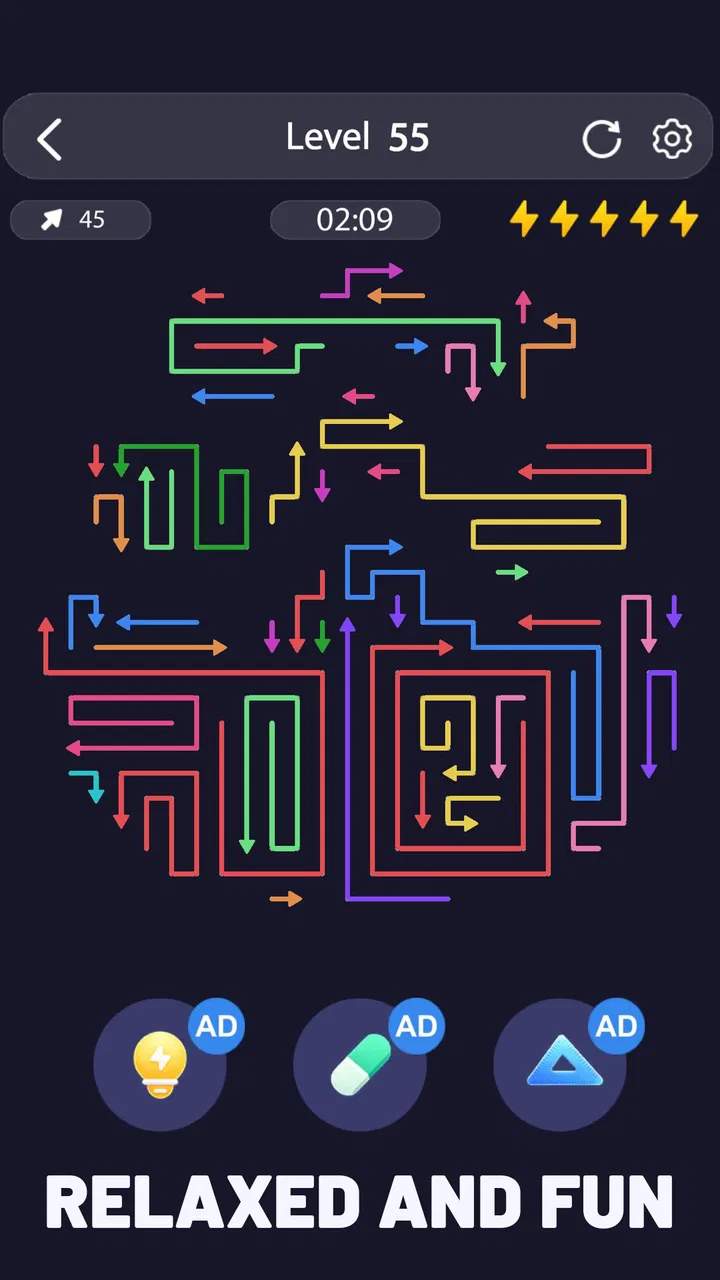
I spent time with Arrow Maze-Tap Away as a small, focused casual game rather than treating it like a quick novelty. Its central idea is easy to understand: you work through maze-like arrow arrangements by moving the arrows in the right way. That simplicity is the main attraction, but it also means the quality of the experience depends heavily on how clearly each board communicates what can happen next.
Made by HONG KONG XINGXI, the game is free and aimed at Everyone. It is available for devices running Android 8.0 or later, and the current version is 1.0.7. The store presents it as a minimalist brain exercise, which matches my first impression: there is no need to learn a large rulebook before starting. You look at the board, identify the available movement, and try to clear the maze without making the layout harder to read.
That low entry barrier makes it appealing for short breaks, quiet concentration, or anyone who likes puzzle games that begin immediately. My more balanced view is that its accessibility comes from the straightforward concept, not from a long list of specialized options. Players who need strong visual customization, carefully explained controls, or more expressive feedback may find the experience less accommodating than the basic rules suggest.
You May Also Like

 Blood Strike: 2.5 Anniversary
Blood Strike’s Loadouts Turn Every Drop Into a Tactical Gamble
A close look at Blood Strike’s custom loadouts: how fast access to signature weapons reshapes its battle royale rhythm, rewards preparation, and narrows the gap between fights.

 Pandora - Music & Podcasts
Pandora’s Music Is Easy to Start, but Harder to Recover
Pandora’s strength is its low-effort path from a seed to a station. Its weak spot is how much confidence it asks you to place in connection, setup, and quiet recovery.

 8 Ball Pool
 Is Built on Rivalries, Rematches, and Routine
A close look at the rivalries, rematches, shared routines, and unanswered safety questions that turn a quick pool match into a persistent mobile community.

 Samsung Music
’s Quiet Strength Is Playing What You Already Own
Its reach comes less from spectacle than from dependable access to a personal library. That simplicity is both the app’s strongest retention engine and its ceiling.

 AccuWeather: Weather Radar
AccuWeather Review: A Quick, Clear Forecast for Everyday Decisions
For everyday plans, the best forecast is the one you can understand quickly. AccuWeather makes rain timing, radar, and local conditions easy to act on, with a few trade-offs.

 Hill Climb Racing
Why Hill Climb Racing Still Turns Crashes Into One More Run
A tiny car, a bumpy hill and one more upgrade: Hill Climb Racing keeps resurfacing because its simple chaos makes every near-miss feel personal.
More From Our News Desk
View All News


How clearly the board communicates its puzzle
I look at this section through the practical question of whether the board lets me understand a move before I make it. The arrow layout gives the puzzle a clear visual grammar, but clarity depends on being able to distinguish direction and follow how open space changes. That matters most when a board becomes crowded, where a brief pause and a smaller, zone-by-zone scan can be more useful than trying to solve everything at once.
Simple rules, but careful reading still matters
The strongest part of the design is that the arrows give the board a natural visual language. I do not need to memorize complicated symbols or manage several unrelated systems. The direction of each arrow is the information that matters, so my attention stays on the relationship between pieces and the open space around them.
That clarity is useful for new players, especially people who are trying a maze puzzle for the first time. I can begin by looking for an obvious move instead of worrying about timers, character abilities, or a large inventory. The game feels closer to a visual sorting exercise than to a traditional action title, which makes it easier to approach at my own pace.
At the same time, minimalist presentation places more responsibility on the board itself. When several arrows point in different directions, I have to distinguish their orientation quickly and remember which movement might open a route for another piece. The screen may look uncluttered, but the decision-making can become dense. A player with difficulty noticing small directional changes may need to slow down and inspect each cluster rather than relying on a quick glance.
Navigation is mental rather than physical
There is an important difference between navigating the app and navigating the maze. Moving through the game is naturally direct: the puzzle is the main destination, and there are not many layers of content to learn before playing. The harder navigation is mental. I have to predict how one arrow affects the remaining arrangement, then avoid tapping based only on the first move that looks possible.
I found it helpful to divide a board into small zones. Instead of scanning the entire maze repeatedly, I first identify an edge or a route with fewer surrounding arrows. From there, I follow the consequences of one move at a time. This is more reliable than tapping rapidly, and it is especially useful when visual attention is limited or when the board becomes tiring to track.
A practical habit is to pause after every meaningful change. I look again at the new open spaces and mentally reset the route rather than assuming the original plan still works. That approach reduces mistakes caused by visual overload. It also turns the game into a manageable sequence of observations instead of one large problem.
Why the minimalist style helps some players
The restrained presentation works well for people who dislike busy puzzle interfaces. There are fewer decorative elements competing with the arrows, so the core task remains visible. For a player who wants a quiet game during a short break, that is a genuine advantage over match-style alternatives filled with animated effects, multiple colors, and constant rewards.
It also makes the game easier to explain to another person. I could describe the activity in a few sentences and let the other player discover the rest through the board. That makes it suitable for casual shared use, such as showing a puzzle to a family member who does not normally play games.
The trade-off is that minimalism is not automatically the same as high readability. People vary in how they distinguish direction, spacing, contrast, and changing shapes. A clean board can still be demanding if the arrows are small on a particular phone or if the player needs stronger visual separation. I would judge the experience on the actual device, not only from the concept.
Reading strategies that make the game friendlier
I recommend beginning with the outermost arrows rather than searching randomly for a solution. Pieces near an edge are often easier to reason about because there are fewer possible obstructions around them. Once one section opens, the newly available space can make the center easier to understand.
Another useful approach is to trace direction with a finger without immediately tapping. I can follow where an arrow appears to lead, compare that route with neighboring pieces, and then commit to the move. This is slower, but it supports players who need extra processing time and reduces the frustration of acting before the board has been fully read.
For users who play with a larger display, the same method becomes even more comfortable because the maze can be viewed from a little farther away. On a smaller phone, holding the device steady and taking short pauses matters more. These are not built-in accessibility tools, but they are realistic ways to make the visual reasoning less tiring.
Motor, sensory, and situational access
Here I consider how deliberate tapping and repeated visual scanning affect play in different everyday settings. The game’s unhurried puzzle format can suit someone who wants time to think, while small targets or visual fatigue may make the same session uncomfortable for others. I also focus on practical ways to judge that fit—such as testing the display at a comfortable size and pace—before deciding whether this style of play works for you.
Tap-based play is approachable, with limits
The game’s basic interaction is appealing because it does not ask me to coordinate a character, swipe at speed, or press several controls in sequence. A player who prefers deliberate taps may find that much easier than an action-oriented casual game. The puzzle structure also means that concentration and planning matter more than reflexes.
That does not make the controls suitable for every motor need. A person with tremors, limited precision, or difficulty maintaining a steady touch may still find individual arrow selection frustrating, particularly when several pieces are close together. The game’s simplicity leaves little room for a missed tap to feel harmless: selecting the wrong area can interrupt the player’s reasoning even when the overall puzzle is understood.
I would be cautious about recommending it as a hands-free option. Its design is built around direct interaction with the maze, and a player who relies on switch access, voice control, or another alternative input method should test whether the device’s own accessibility features can operate the required taps comfortably. That depends on the phone and operating system rather than on a capability I can attribute to the game itself.
Why pace can improve comfort
One positive aspect is the absence of pressure in the core idea. I can stop to examine a route instead of reacting to an enemy or a countdown. For players who process visual information more slowly, that difference is meaningful. The game gives the puzzle itself the leading role, so careful observation is a valid way to play rather than a disadvantage.
I still noticed that repeated visual scanning can become tiring. The challenge is not only finding a move; it is repeatedly comparing arrow directions, open spaces, and blocked paths. I would use it in short sessions if screen fatigue is a concern. Lowering the phone’s brightness to a comfortable level, enlarging system text where possible, and taking a break between boards can make the activity easier on the eyes, although those adjustments come from the device rather than the game.
Players sensitive to sudden sound or animation may appreciate the restrained puzzle format compared with more theatrical casual titles. Conversely, anyone who depends on strong audio cues should not assume that a visually driven board will provide equivalent information through sound. The arrows are the main source of meaning, so the experience is fundamentally visual and spatial.
Color is not the only information, but shape still matters
The arrow form is helpful because direction is represented by shape, not merely by a color category. That gives the player something structural to inspect. Someone who has difficulty distinguishing certain colors may therefore find the concept more approachable than a puzzle that asks them to match colored tiles alone.
However, shape-based information can still be difficult when pieces are tightly arranged or viewed on a small screen. Directional symbols need to be recognized accurately, and a player with low vision may need to move closer, use device magnification, or choose a larger screen. I would not describe the game as universally accessible just because it uses arrows; the practical experience will depend on display size, visual acuity, and the player’s preferred settings.
Useful everyday situations
I see the game working well during a waiting period when I want something more engaging than scrolling but less demanding than a long story game. A short puzzle session can fit into a bus ride, a quiet coffee break, or the few minutes before an appointment. Because the task is self-contained, I can focus on one board and put the phone away without needing to remember a complicated narrative.
It can also suit a calm evening routine for someone who enjoys structured mental activity. I would avoid playing when I am already visually exhausted, though. The fact that a game is quiet does not mean it is restful for the eyes. The best use case is a player who wants deliberate concentration in small portions, not someone looking for a passive way to unwind.
For shared play, one person can study the board while another suggests a possible route. That can be a pleasant way to involve someone who does not normally play games, but the experience may become less comfortable if both people are trying to tap the same small targets. In that situation, I would treat it as a discussion puzzle rather than a competitive one and let the person holding the device control the pace.
Where usual alternatives may be better
Compared with match-three games, this title is less dependent on rapid visual matching and more dependent on spatial planning. That makes it a better choice for someone who wants a quieter, more thoughtful challenge. Match-three games may be preferable for players who enjoy bright feedback, quick turns, and a stronger sense of constant reward.
Compared with word puzzles, Arrow Maze-Tap Away does not require spelling knowledge or language comprehension to understand its central action. That can make it more approachable across language backgrounds. Word games remain the better option for players whose main interest is vocabulary, clues, or verbal reasoning rather than visual routes.
Compared with physics puzzles, it appears more contained and less dependent on experimenting with unpredictable motion. A player who wants precise visual logic may prefer that. Someone who enjoys watching objects bounce, collide, or behave unexpectedly may find this format too restrained.
Traditional maze games can offer a stronger sense of exploration because the player moves through a continuous environment. Here, the appeal is the arrangement of arrows and the act of clearing a board. I would choose this game for compact reasoning tasks, not for atmosphere, storytelling, or a feeling of travelling through a world.
Remaining barriers and honest limitations
The biggest barrier is the narrowness of the interaction. Direct tapping is easy to understand, but it may not be easy to perform precisely for every player. A missed selection can be especially discouraging when the player has already spent time constructing a solution in their head. Anyone with motor limitations should try a few boards before deciding whether the target spacing feels manageable.
The second barrier is visual dependence. The arrows carry the essential information, and the player must repeatedly inspect their orientation. People who need high-contrast presentation, larger symbols, alternative descriptions, or nonvisual feedback may find that the basic design does not meet their needs without help from device-level tools.
A third limitation is the lack of a broader reason to continue for players who need variety. The minimalist concept is focused, which is a strength for some and a weakness for others. If I want a casual game with characters, social interaction, changing modes, or a more expressive reward structure, I would look elsewhere. This is best approached as a concentrated puzzle activity rather than an all-purpose game.
The game’s free price lowers the risk of trying it, and the Everyone rating makes it suitable for a broad audience in age terms. Those facts do not guarantee that every person will find the visual and motor demands comfortable. I would still make the decision based on the player’s needs, the size of the phone, and whether deliberate tapping feels natural.
Who should install it
I would recommend it to someone who enjoys visual logic, prefers short sessions, and likes solving a board without pressure from fast action. It is also a sensible pick for players who want a casual brain exercise that can be explained quickly and played without a large commitment. The strong response from users is reflected in its 4.8 average from around 52 thousand ratings, while its reach has passed 500 thousand installs, so it is clearly attracting more than a tiny niche.
I would be more selective for a player with low vision, significant tapping difficulty, or a strong need for audio-led interaction. The game may still be worth testing with device accessibility settings, but I would not promise that those tools will transform a visually dense board into an easy experience. A word puzzle, audio game, or title with explicit visual customization could be a better fit depending on the person.
Players who dislike repetition should also think twice. The central pleasure comes from reading arrow arrangements and improving the next decision. If that loop sounds satisfying, the focus is an advantage. If you need changing objectives or a story to maintain interest, the same focus may feel limited after the initial curiosity fades.
My inclusive verdict
After using it as a visual puzzle rather than judging it only by its short description, I think Arrow Maze-Tap Away succeeds at making its basic idea approachable. The arrows provide a direct entry point, the pace favors thought over reflex, and the uncluttered presentation can be more comfortable than the busy style common in many casual games. For me, its best quality is that it respects a player who wants to stop, inspect, and decide.
Its accessibility has clear boundaries. The game does not remove the need for accurate visual reading or controlled tapping, and those demands may become the deciding factor for some users. I also would not choose it for audio-first play, rich variety, or a highly social experience. Its inclusive value comes from simplicity and patience, not from specialized support that I can assume will work for everyone.
Still, the free entry point makes experimentation reasonable. I would install it on a comfortable screen, try a few boards without rushing, and pay attention to whether the arrow shapes remain easy to distinguish and select. If they do, this is a focused little casual game that can fit naturally into everyday pauses. If they do not, the usual alternatives with larger controls, verbal clues, or stronger customization will probably serve you better.
HONG KONG XINGXI has kept the concept narrow, and I see that as both the game’s identity and its main limitation. Choose it when you want calm, visual route-solving in short sessions; skip it when your priority is flexible input, nonvisual feedback, or a wider range of activities. That is the fairest way to understand what this game offers and where it may still leave players behind.
FAQs for Arrow Maze-Tap Away
01What is Arrow Maze-Tap Away and how does it work?
Arrow Maze-Tap Away is a puzzle-based game where players navigate through intricate mazes using directional arrows to guide their path. The objective is to tap and rotate arrows strategically to clear the maze. With intuitive controls and increasing complexity, it challenges players to think critically and plan their moves.
02Is Arrow Maze-Tap Away free to play, and are there in-app purchases?
Arrow Maze-Tap Away is free to download and play. However, the game offers in-app purchases that enhance the experience, such as additional hints, ad-free gameplay, and exclusive levels. These purchases are optional and designed to support the development of new features and updates.
03What platforms is Arrow Maze-Tap Away available on?
Arrow Maze-Tap Away is available on both Android and iOS platforms. It can be downloaded from the Google Play Store for Android devices and the Apple App Store for iOS devices, ensuring broad accessibility for players on various smartphones and tablets.
04What age group is Arrow Maze-Tap Away suitable for?
Arrow Maze-Tap Away is suitable for players of all ages, offering fun and challenging puzzles that are appropriate for both children and adults. The game’s user-friendly interface and varying levels of difficulty make it an engaging experience for puzzle enthusiasts across different age groups.
05Does Arrow Maze-Tap Away require an internet connection to play?
Arrow Maze-Tap Away can be played offline, making it convenient for users who want to enjoy the game without an active internet connection. However, certain features, such as leaderboards and multiplayer modes, may require internet access to function fully.
Pros
- Engaging and intuitive gameplay.
- Visually appealing graphics.
- Smooth and responsive controls.
- Challenging levels with increasing difficulty.
- Minimal ads for a free app.
Cons
- Can feel repetitive over time.
- Limited tutorial for beginners.
- Occasional in-app purchase prompts.
- Lacks multiplayer mode.
- Some levels may feel too difficult.

Arrow Maze-Tap Away
Gallery